


Powerful Features for Yellow Pages Extraction
Everything you need to scrape business leads from yellowpages.com in one click
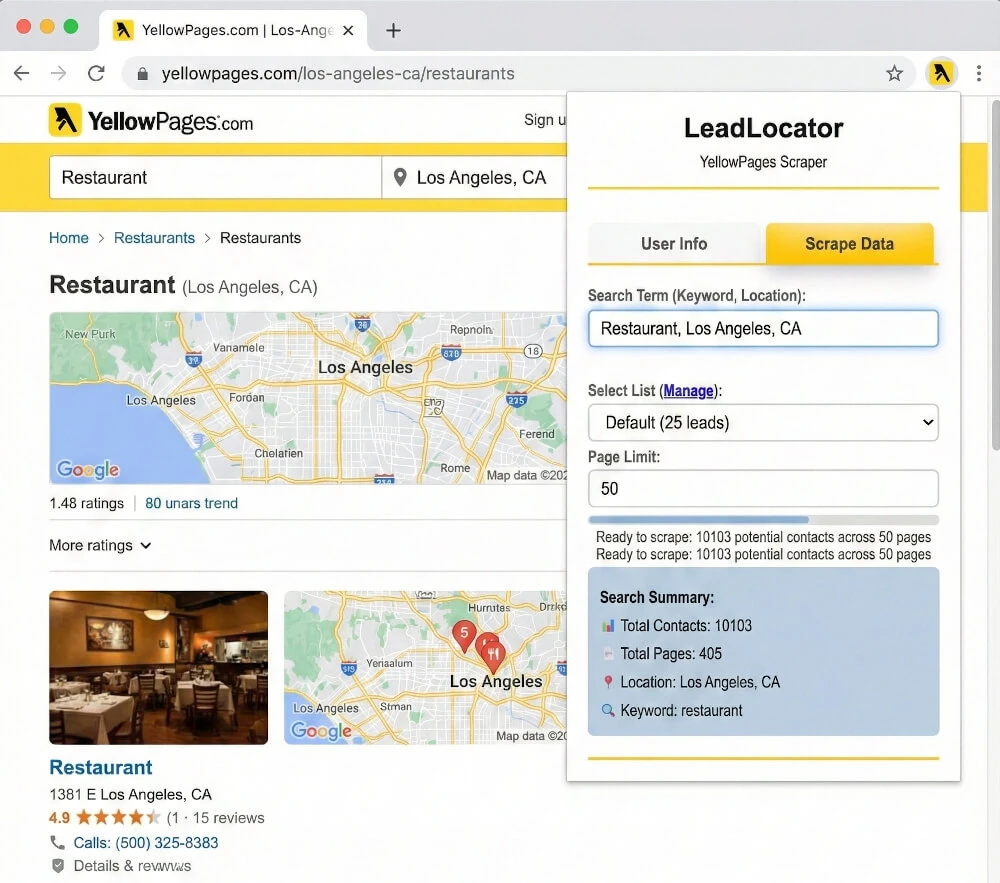
Real-Time Lead Insights
Get instant analysis of potential leads with contact count preview and page-by-page breakdown before scraping.
Smart Scraping Technology
Automatic parameter detection extracts search terms and locations intelligently with real-time progress tracking.
Advanced Lead Management
Save leads to multiple prospect lists, monitor quotas, and export data with one click to your LeadLocator account.
Intelligent Page Management
Set custom page limits for controlled scraping. Perfect for targeted data extraction without overwhelming your system.
One-Click Data Export
Direct access to your saved leads. Export to CSV, Excel, or integrate with your CRM instantly.
Built for Yellow Pages
Extract structured business data from yellowpages.com listings — business name, phone, address, and category — with one click.
How to Use the LeadLocator Yellow Pages Scraper Extension
Start extracting Yellow Pages business leads in under 2 minutes
1. Install Extension
Add the free Chrome extension from the Chrome Web Store with one click. No configuration needed.
2. Search on Website
Perform a business search on yellowpages.com or navigate to the Yellow Pages search results you want to scrape.
3. Analyze Results
Click the LeadLocator widget to see potential lead count and page breakdown instantly.
4. Configure Settings
Select your target list and set custom page limits for controlled data extraction.
5. Start Scraping
Begin extraction with real-time progress tracking and watch as data flows into your account.
6. Access & Export
Access your saved leads in LeadLocator platform and export to CSV, Excel, or your CRM.
Perfect For Every Business Need
How businesses use the LeadLocator Yellow Pages Scraper Chrome Extension
Sales & Marketing Teams
Build targeted prospect lists from business directories. Extract contact information for cold outreach campaigns and lead generation.
Recruiters & HR
Extract candidate information from job boards and professional networks. Build talent pipelines efficiently.
Market Researchers
Gather competitive intelligence and market data. Analyze pricing, product listings, and industry trends.
E-commerce Businesses
Monitor competitor pricing, extract product data, and track inventory from marketplace websites.
Frequently Asked Questions
Everything you need to know about the LeadLocator Yellow Pages Scraper Chrome Extension
Start Scraping Yellow Pages Leads with LeadLocator
Install the free LeadLocator Chrome extension and extract Yellow Pages business data in minutes
- 100% Free Forever
- No Credit Card Required
- Install in 30 Seconds